Aerivon Live started as a simple question I kept asking myself: what would it feel like to talk to an AI that could see, hear, and respond in real time without the friction of a text box? I wanted a platform that made Google's Gemini Live API feel tangible and practical, not just a demo prompt. The result is Aerivon Live, a comprehensive, real-time multimodal AI agent platform with eight distinct applications that explore voice, vision, screenshots, and automation in a single session.
If you want to jump in right away:
- Live demo: https://aerivon-live-frontend-oauob6cvnq-uc.a.run.app/
- Source code: https://github.com/JedidiahBowlding/Aerivon-Live-2.0
What Aerivon Live Is
Aerivon Live is a set of eight mini-apps that showcase the Gemini Live API in real-world scenarios:
- Interactive Storybook (primary showcase): creates stories with AI-generated illustrations in real time.
- Live Agent: voice-first conversations with interruption support (barge-in).
- UI Navigator: vision-guided browser automation with Playwright.
- Real-Time Translator: multilingual live voice translation.
- Vision Tutor: live Q and A on what the camera sees.
- Customer Support: task-driven voice interactions with structured outputs.
- Workflow Automator: voice-driven flow execution.
- Visual Q and A: screenshot-based question answering.
The goal was to make each demo feel like a product slice, not a toy. Every app is built on the same core architecture so I could stress-test the APIs across different modalities without rewriting the stack each time.
The Challenge
I had three technical goals that guided everything else:
- Break the text box paradigm. I wanted the primary interface to be voice, not typed prompts.
- Support barge-in. Users should be able to interrupt and steer the AI mid-response, just like a real conversation.
- Unify multimodal inputs. Voice, vision, and screenshots should all live inside the same session and not feel bolted on.
These goals pushed me toward a streaming-first architecture and forced me to design the UI so responses could appear as a sequence of incremental, real-time events instead of a single static response block.
Tech Stack Highlights
- AI Models: Gemini 2.5 Flash Image Preview (native multimodal) and Gemini Live API
- Backend: Python FastAPI, Google GenAI SDK, Playwright for automation
- Frontend: Vanilla HTML, CSS, and JavaScript with WebSocket streaming
- Cloud: Vertex AI, Cloud Storage, Cloud Run
- Infrastructure: Cloud Build for automated deployment
Architecture Overview
At a high level, Aerivon Live is a WebSocket-driven, event-based system that streams partial model output to the browser. Each app is a thin layer over a shared core: the same server, the same streaming protocol, and a shared set of utilities for translating between audio, images, and text.
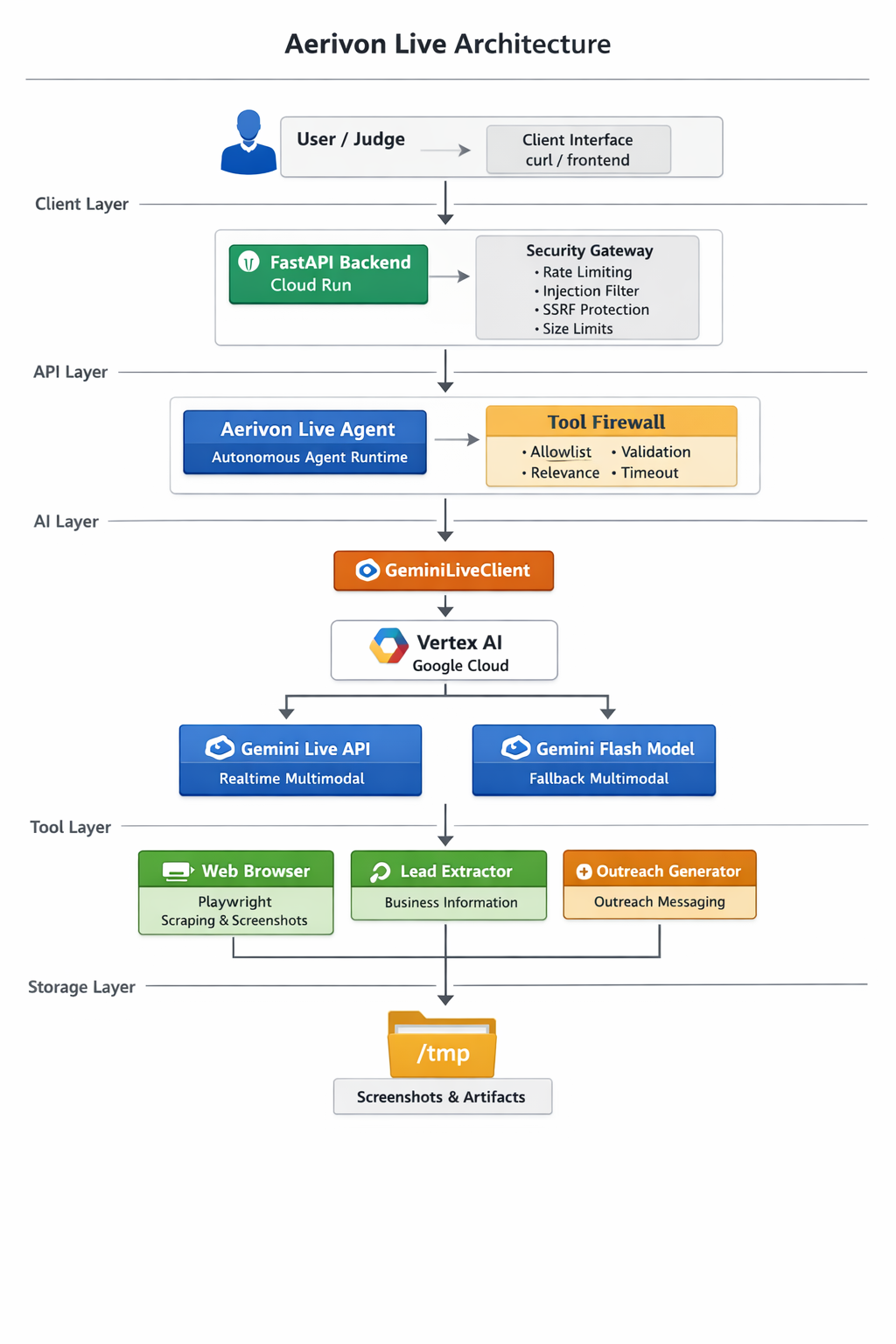
Key architectural pieces:
- Vertex AI + ADC: Application Default Credentials keep local dev friction low and make Cloud Run deployment straightforward.
- WebSocket streaming: The client receives incremental text tokens and images as soon as they are available, which improves perceived responsiveness.
- Playwright integration: For the UI Navigator and Workflow Automator, Playwright provides vision-guided control over a browser session.
- Google Cloud Storage: Stores AI-generated story artifacts and session memories.
- Cloud Run + Cloud Build: Push-to-deploy workflow with reproducible builds.
The architecture deliberately keeps the browser as dumb as possible: the client listens to a stream of events and renders them. That decision is what made interruption support and multimodal streaming feel natural.
Featured Applications
Interactive Storybook (Primary Showcase)
The storybook is where the multimodal stack shines. A user speaks a prompt, the system generates a story and matching illustrations, and the UI streams both text and images as they arrive. The biggest challenge here was keeping the text and images in sync without blocking the whole response. The solution: treat images as first-class streamed events instead of a post-processing step.
Live Agent (Voice + Barge-In)
The Live Agent app is the most human-feeling experience. The key is barge-in: if you start talking while the AI is responding, the stream must stop and a new session should begin immediately. This required careful session state management and an explicit cancel signal between client and server.
UI Navigator (Vision-Guided Automation)
UI Navigator combines screenshots with Playwright automation. The model sees the UI, proposes a next action, and the server executes it. It is a surprisingly fun way to translate natural language intent into real browser actions, and it works as a stepping stone for more complex automation flows.
Real-Time Translator
Streaming audio in, streaming audio out, with the model bridging the translation in between. The core challenge was keeping latency below one second, which meant lightweight buffering, short audio frames, and aggressive streaming behavior.
Key Technical Decisions and Learnings
1) Native Multimodal Over Text Parsing
I initially attempted a text parsing approach where the model emitted placeholders like
[IMAGE: ...] and a separate image generation call would follow. It worked, but
it felt brittle and required too much glue code.
Switching to a native multimodal model simplified everything. With
response_modalities set to include both text and image outputs, I could get
cohesive responses from a single API call and the model had better context awareness.
response = client.models.generate_content(
    model="gemini-2.5-flash-image-preview",
    contents=prompt,
    response_modalities=["TEXT", "IMAGE"],
)
Lesson: when a model has native capabilities, it is almost always better to use them directly instead of simulating the behavior in post-processing.
2) Model Location Requirements
I discovered that model availability varies by region. I initially used us-central1,
which worked for baseline models but blocked access to image preview capabilities. The fix
was to switch to a global location for the image preview model.
Lesson: treat model location as a first-class configuration value and document it clearly in deployment scripts.
3) WebSocket Streaming Architecture
Streaming is not just about speed. It changes how the experience feels. When text appears incrementally and images pop in as they are generated, the user stays engaged. This required a protocol that could interleave text tokens, images, and control messages in the same stream.
socket.onmessage = (event) => {
  const msg = JSON.parse(event.data);
  if (msg.type === "text") {
    appendTextChunk(msg.delta);
  } else if (msg.type === "image") {
    insertImage(msg.base64);
  } else if (msg.type === "end") {
    finalizeResponse();
  }
};
Lesson: design your client around events, not responses. It makes interruptions, streaming, and latency handling much easier.
4) Cloud Storage for AI-Generated Content
For the storybook, I wanted every story to be fully portable. That meant storing both the text and the illustrations together in a single artifact. I chose to store base64-encoded images inside JSON objects in Google Cloud Storage. The files are larger, but the stories are self-contained and easy to move around.
Lesson: data portability matters more than file size when the content is user-generated and meant to be shared.
5) Developer Experience Tooling
I built an aerivon launcher script that boots the backend and frontend together,
sets environment variables, and keeps logs clean. It is a small piece of tooling, but it
saved me hours during iteration.
Lesson: invest in DX early. Small scripts compound into big time savings.
Deployment and Infrastructure
Deployment is automated end-to-end. Cloud Build handles CI and CD, and Cloud Run provides serverless scaling with minimal ops overhead. If you want the exact deployment flow, these resources are the canonical references:
- Deployment script: https://github.com/JedidiahBowlding/Aerivon-Live/blob/main/scripts/deploy_cloud_run.sh
- Cloud Build pipeline: https://github.com/JedidiahBowlding/Aerivon-Live/blob/main/cloudbuild.yaml
The architecture relies on environment-based configuration so local development can stay simple while production runs on managed services. That means the same server code works locally and in Cloud Run, with only a change in environment variables.
Results and Impact
- 8 working demo applications
- Real-time voice interactions with sub-second perceived latency
- Native multimodal content generation with Gemini 2.5 Flash Image Preview
- Persistent story storage in Google Cloud Storage
- Automated deployment with Cloud Build and Cloud Run
The biggest surprise was how quickly the experience felt alive once streaming was in place. It turned a technical demo into something that felt like a product.
Future Enhancements
- Story gallery UI with thumbnails
- Public story sharing via unique URLs
- Advanced editing (regenerate specific scenes)
- Multi-language story generation
- Export to PDF or EPUB
Additional Resources
- Full project description: https://github.com/JedidiahBowlding/Aerivon-Live/blob/main/PROJECT_DESCRIPTION.md
- Technical details: https://github.com/JedidiahBowlding/Aerivon-Live/blob/main/SUBMISSION.md
Call to Action
If you want to explore real-time multimodal AI in action:
- Try the live demo: https://aerivon-live-frontend-621908229087.us-central1.run.app
- View the source code: https://github.com/JedidiahBowlding/Aerivon-Live
- Read the project description: https://github.com/JedidiahBowlding/Aerivon-Live/blob/main/PROJECT_DESCRIPTION.md
If you are building with Gemini Live API or experimenting with WebSocket streaming, I would love to hear what you are working on.